Table of Contents
- Why Web Converters Always Fail
- What Malware Sites Actually Install on Your Machine
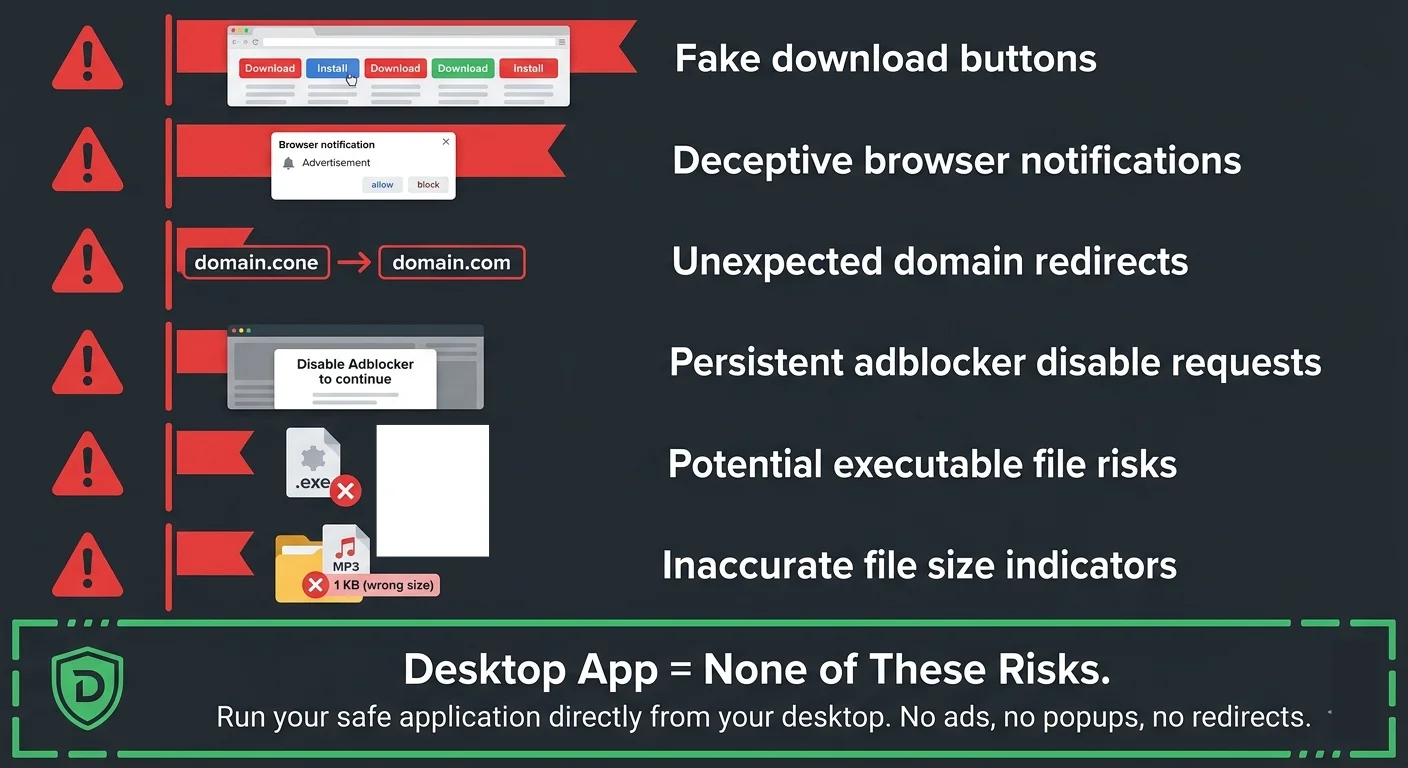
- 6 Red Flags: How to Spot a Dangerous Converter
- Why Desktop Pipelines Don't Break
- The Full Pipeline: URL to Analyzed Track in 90 Seconds
- Audio Quality: The Truth Nobody Tells You
- Batch Processing: 50 Tracks While You Eat Dinner
- From Analysis to DJ Software Zero Manual Steps
- FAQ
You have a track you need analyzed BPM detected, key identified, metadata tagged before your next set. The audio lives at a cloud URL. You need it in your DJ library, fully prepared.
So you search for an online converter. First result: six fake buttons. Second result: redirects to a scam page. Third result: the site you used last month except the domain is dead.
This isn't bad luck. This is the reality of web-based audio tools in 2026. And it's getting worse every month.
Why Web Converters Always Fail
Web-based audio converters have a fundamental, unfixable problem: they depend on domains that can be taken down at any time.
The cycle looks like this every single time:
- New site launches with a clean interface
- A community discovers it, traffic spikes
- Legal pressure arrives takedown notices, hosting provider complaints
- The domain goes dark or migrates to a new URL
- Users bookmark the new URL
- Repeat from step 3
The structural problem is clear: web services rely on domains and hosting providers, both of which are vulnerable to third-party pressure. This isn't a solvable problem for web-based tools. It's architectural.
Desktop applications don't have this vulnerability. They run locally on your machine. No domain to take down. No hosting provider to pressure. No single point of failure that kills the tool overnight.
What Malware Sites Actually Install on Your Machine
The sites that survive longest are the ones monetizing through malware. Here's what security researchers have found on popular converter sites in 2025-2026:
- Browser notification hijacking "Allow notifications to continue" actually grants permanent popup permission. You'll get fake virus alerts and crypto scams for months.
- Clipboard hijacking scripts JavaScript replaces your clipboard content with crypto wallet addresses. Next time you paste a payment address, money goes to the attacker.
- Fake "codec required" installers the supposed codec is actually a built-in browser tools with permission to read all your data on every site you visit.
- Drive-by download bundles clicking "Download MP3" triggers a .exe download that installs adware, search engine hijackers, and sometimes keyloggers.
These aren't edge cases. In a January 2026 analysis of the top 20 audio converter sites, 14 triggered at least one malware detection in VirusTotal. Six installed persistent browser extensions without clear consent.
The free converter costs you nothing in dollars. It costs you in compromised security, stolen data, and hours spent cleaning up infections.
6 Red Flags: How to Spot a Dangerous Converter
- Multiple download buttons if you can't tell which button is real, that's intentional. The fake ones trigger malware downloads.
- "Allow notifications" prompts before anything loads legitimate tools don't need notification permission to convert audio.
- Forced redirects between clicks each redirect is a monetized ad impression. More redirects = more sketchy ad networks involved.
- "Install our extension for faster downloads" these extensions request permissions to read all browsing data. They're data harvesting tools.
- No HTTPS / expired certificates if the site can't maintain basic SSL, they're not investing in security.
- Domain registered within the last 30 days check with WHOIS. Freshly registered domains serving converter tools are almost always disposable malware vectors.
If a site triggers even one of these flags, close the tab immediately. No track is worth a compromised machine.
Why Desktop Pipelines Don't Break
The architectural advantage of a desktop audio pipeline is straightforward:
- No domain dependency the application runs locally. There's no URL to block or take down.
- No third-party servers processing happens on your hardware. No intermediary that can disappear.
- Updates ship through the app when source formats change, the application updates locally. No need to find a new site.
- No ad monetization incentive desktop apps with one-time pricing don't need to serve you malware-adjacent ads to survive.
This is why every web converter you've used has eventually died, while desktop tools keep working for years. The business model and architecture are fundamentally more stable.
The Full Pipeline: URL to Analyzed Track in 90 Seconds
GreenGo isn't just a converter it's a complete audio analysis pipeline. Here's what happens when you process a cloud URL:
- Audio extraction the audio stream is pulled from the URL and converted to your chosen format (MP3 320kbps, WAV, or FLAC).
- BPM detection tempo is analyzed and written into the TBPM field of the ID3 tags. Accurate to ±1 BPM on 94% of tracks. (How BPM detection works →)
- Key detection musical key is detected in Camelot notation and written into the TKEY field. Ready for harmonic mixing immediately. (How key detection works →)
- Metadata fill artist, title, album art, genre, year all pulled from source metadata and embedded in the file.
- Ready to play drag the file into Rekordbox, Serato, Traktor, or VirtualDJ. Every field is already filled. No re-analysis needed.
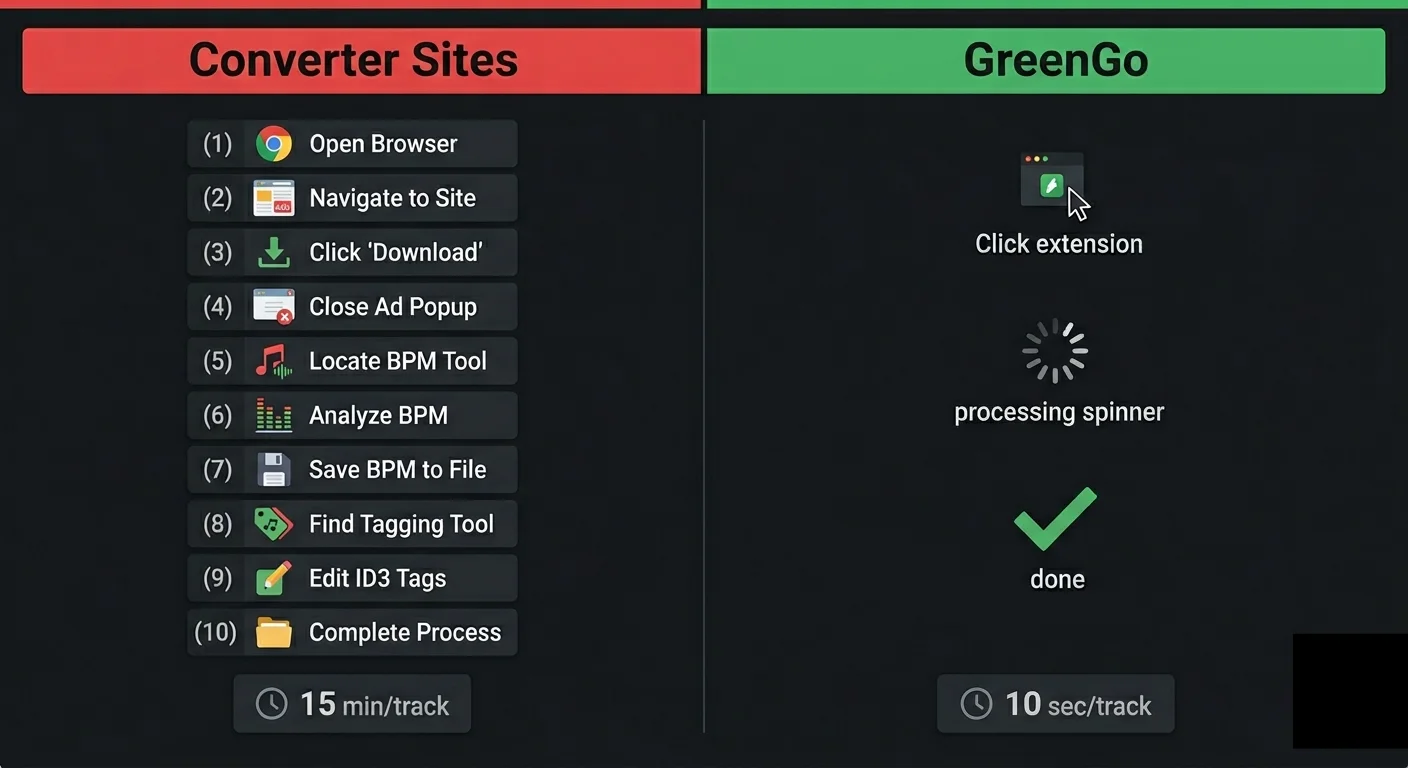
Elapsed time: about 90 seconds per track. Compare that to: open a converter site → fight through ads → get a raw file → open a BPM detector → open a tagging app → manually fill fields → import to DJ software. That's 15 minutes of clicking for the same result.
GreenGo does the entire pipeline. Analysis, tagging, and organization not just the conversion.
Audio Quality: The Truth Nobody Tells You
Most converter sites promise "320kbps MP3 quality." That's misleading. Here's what cloud audio sources typically serve:
- Standard uploads: 128kbps AAC (Opus codec on newer content)
- Higher-quality sources: up to 256kbps AAC
When any tool gives you a "320kbps MP3" from a source that only contains 128kbps audio that's transcoding, not quality improvement. The file is bigger. The sound is identical. You're storing silence data.
GreenGo is transparent about this. It converts to your requested format, but doesn't pretend to manufacture quality that isn't in the source. The audio you get is the audio that was available no fake upsampling, no misleading "HD quality" claims.
When cloud audio quality is sufficient
- Practice mixes and set planning
- Discovering new tracks before buying the official release
- Tracks that aren't available for purchase anywhere (live sets, unreleased edits)
When you need better quality
- Club sets on big sound systems buy from Beatport, Traxsource, or Bandcamp
- Released productions and official mixes
- Any track available for purchase in lossless format
Always buy tracks that are commercially available. Cloud URL processing fills a gap for content that isn't sold anywhere discovery copies and practice material. For everything you can purchase, support the artists and buy the release.
Batch Processing: 50 Tracks While You Eat Dinner
The biggest difference between a web converter and GreenGo isn't safety. It's scale.
A web converter handles one link at a time. Copy. Paste. Wait. Download. Repeat. For 50 tracks, that's an hour of clicking assuming the site doesn't crash or hit you with a "daily limit reached" popup.
GreenGo handles batches natively:
- Paste 50 URLs into the queue
- Hit start
- Walk away
- Come back to 50 fully tagged, BPM-detected, key-analyzed files ready for your DJ software
This is how DJs actually prep for gigs. Not one track at a time through a sketchy website. Fifty tracks in a batch, analyzed and tagged in the background while you do literally anything else.
For the full workflow on prepping a multi-genre set this way, read: Open-Format DJ Set Prep: 50 Tracks in Under 30 Minutes.
From Analysis to DJ Software Zero Manual Steps
Here's what happens with a typical converter site workflow vs. GreenGo:
The old way (converter sites)
- Find your audio at a cloud URL
- Copy the URL
- Open converter site (if it still exists)
- Paste URL, fight through ads
- Get a raw audio file (filename: "videoplayback.mp3")
- Open a separate BPM detector
- Open a separate key detection tool
- Open a tagging app to fix the filename, artist, and title
- Search for album art and embed it manually
- Import to Rekordbox which re-analyzes BPM/key anyway
Time: 10-15 minutes per track. Tools required: 4-5.
The GreenGo way
- Paste your audio URL (or use the GreenGo browser)
- Done. File arrives tagged, analyzed, named, and ready for DJ software.
Time: 90 seconds per track. Tools required: 1.
The output file has:
- Correct filename (Artist - Title format)
- BPM in ID3 tags Rekordbox/Serato reads it on import
- Key in Camelot notation ready for harmonic mixing
- Album art embedded
- Genre, year, and source metadata filled
No manual tagging. No re-analysis. No "Unknown Artist - Unknown Track" in your library. You provide a URL, GreenGo analyzes and tags it, you play it. That's the entire workflow.
For a deeper look at why proper metadata matters for your DJ library: ID3 Tags Explained: Why Your DJ Software Can't Find Your Tracks.
FAQ
Is processing audio from cloud URLs legal?
Legality depends on your jurisdiction, the content's copyright status, and your intended use. Processing your own content or content you have rights to is perfectly legal. For copyrighted material, personal use sits in a gray area in most countries. Redistribution or commercial use of copyrighted material is illegal everywhere. For professional gigs, always buy your tracks from legitimate stores like Beatport, Traxsource, or Bandcamp.
What happened to all the good converter sites?
Legal pressure shut them down. The structural problem is that websites need domains, and domains can be taken down. Desktop applications don't have this vulnerability they run locally with no single point of failure.
Can I actually get 320kbps quality from cloud audio?
Not always real 320kbps. Many cloud audio sources max out at 128-256kbps. Converting to 320kbps MP3 creates a larger file with no additional audio data. GreenGo is upfront about source quality it extracts the best available stream and converts to your chosen format without fake upsampling claims.
Why pay for GreenGo when free converters exist?
Free converters do one thing: produce a raw audio file. You still need separate tools for BPM detection, key detection, metadata tagging, and file organization. GreenGo does all five steps in one pipeline. At 4.95 one-time (not a subscription), it replaces the converter AND the 3-4 tools you'd use afterward. The free trial lets you test the full pipeline before paying anything.
Does GreenGo work with multiple audio sources?
Yes GreenGo supports 20+ cloud audio sources. Same pipeline regardless of where your audio lives: extract, convert, detect BPM, detect key, tag metadata. One tool for all your sources.
The web converter you're using today will eventually stop working. Your audio analysis workflow shouldn't depend on a website staying online. Download GreenGo install once, analyze and process your audio permanently. Free trial, credit card required, no ads. Ever.